Check Point CCSA + CCSE NGX
國際認可証書課程

隨著網絡技術日益普及,大家都開始擔心網絡和資訊保安的問題。故此各大網絡硬件和軟件製造商紛紛推出多個保安產品以提升企業網絡保安水平。 Check Point 便是當中的翹楚。 Check Point 是著名的防火牆 (Firewall) 及虛擬私人網絡 (VPN) 的設計和生產商,其產品遍佈全球。故此掌握 Check Point 技術乃是大勢所趨。
為證明您能掌握各項 Check Point 技術, Check Point 推出了一系列的認證。而最為普遍的有:
CCSA (Check Point Certified Security Adminsitrator)
CCSE (Check Point Certified Security Expert)
CCSE + (Accelerated Check Point Certified Security Expert)
CCSA 是 Check Point 入門級的認證,考過 CCSA 後,同學便可以考取更高級的 CCSE 認證,而考過 CCSE 後,同學有興趣的話可追求 CCSE+ 以透徹了解 Check Point NGX 軟件。
本課程專為同學考取 CCSA+CCSE 證書而設,導師將在課堂上使用 Check Point NGX VPN-1/Firewall-1 示範和教導各項 Check Point 技術。修畢CCSA課程後,便可參加考試 156-215.70 ( Check Point Certified Security Administration R70 ) ,合格後便可成為 CCSA 。 修畢CCSE課程後,便可參加考試 156-315.70 ( Check Point Certified Security Expert R70) ,合格後便可成為 CCSE!!
合格保證!!!
CCSA+CCSE 的認證資格
應試者需要滿足下列要求:
科目 (需要 2 項考試)
| 156-215.70 |
Check Point Security Administration NGX R70 |
| 156-315.70 |
Check Point Certified Security Expert NGX R70 |
試題數量: 73 題(CCSA), 71 題(CCSE)
考試時間: 120 分鐘
合格分數: 70 %
CCSA 模擬試題參考
CCSE 模擬試題參考
考試是由遍佈世界各地的獨立認可考試組織 Virtual University Enterprises 在世界各地主持舉行。
授課導師擁有10年認可考試課程教學經驗 ,同學在完成18個小時的專業課程後,我們更安排學生在VUE認可考試中心報考,CCSA及CCSE考試費用各$1560。
CCSA + CCSE 課程內容:
Module1: VPN-1 NGX Overview
‧ Check Point's Secure Virtual Network (SVN) architecture.
‧ Understanding SmartConsole 、 SmartCenter Server and Security Gateway.
‧ Understanding the basic functionalities of each component in SmartConsole.
‧ Understanding Secure Platform
‧ Understanding different installation types – standalone and distributed
Module2: The Security Policy
‧ Security Policy and Rule Base
‧ Creating objects in SmartDashBoard
‧ Exporting SmartMap in SmartDashBoard
‧ Understanding IP Spoofing and prevent IP Spoofing in NGX
‧ Creating rules in SmartDashBoard
Module3: Monitoring Traffic and Connections
‧ Use SmartView Tracker to view the Log
‧ Use SmartView Tracker block active traffic
‧ Use SmartView Monitor view the system status and alerts
‧ Use SmartView Monitor block suspicious traffic
Module4: IPS
‧ Understanding and blocking DOS (Denial-of-Service) attacks
‧ Understanding and blocking attacks based on IP and ICMP
‧ Understanding and blocking attacks based on TCP
‧ Understanding and detect port scanning by SmartDefense
‧ Understanding and detect successive multiple connections by SmartDefense
Module5: Network Address Translation
‧ Understanding the general concept of NAT
‧ Understanding and configuration of Hide NAT
‧ Understanding and configuration of Static NAT
‧ Understanding and configuration of Manual NAT
Module6: Encryption and VPN
‧ Understanding Symmetric Encryption
‧ Understanding Asymmetric Encryption
‧ Understanding Message Integrity
‧ Understanding Digital Certificate
‧ Understanding Internet Key Exchange (IKE)
‧ Understanding Tunnel Mode Encryption
Remark: The configuration section of VPN will be covered in CCSE Course
Module7: Users and Authentication
‧ Understanding the meaning the authentication
‧ Creating user temples
‧ Creating User Accounts
‧ Creating Groups
‧ Understanding and Configuration of User Authentication
‧ Understanding and Configuration of Client Authentication by port 900
Module8: LDAP User Management with SmartDirectory
‧ Understanding LDAP
‧ DN (Distinguished Name)
‧ CN (Common Name)
‧ Example of LDAP
‧ Integrating Microsoft Active Directory to NGX for authentication
Module9: Disaster Recovery
‧ Understanding Database Revision Control
‧ Understanding and performing Backup
‧ Understanding and performing Restoration
Module10: VPN Foundation
‧ Understanding Site to Site VPN
‧ Understanding Remote Access VPN
‧ Understanding SSL VPN
Module11: Configuring VPN
‧ Configuring VPN User
‧ Configuring VPN Policy
‧ Configuring VPN Rule
‧ Verify VPN configuration
Module12: Understanding HA
‧ Unicast and Multicast HA
‧ HA Components
‧ HA Application.
適合人仕 :
技術支援人員,系統工程師,
網絡工程師,網絡分析員, I.T 部門主管 / 經理。
修讀條件 :
• 具基本 Windows Server 知識
• 具基本 TCP / IP 知識 |
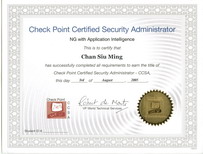
Check Point CCSA Certifiate
|
課程包括 :
- 一人一機即時實習
- 由 CCSE / CCSE+ and CCIE 導師執教
- 導師精心編製筆記 - 考試合格保障 |
- CCSA + CCSE PDF 電子書
- 每月更新的 模擬試題連參考答案 (模擬試題 "一年" 免費更新保證,考試更有彈性)
- Check Point NGX VPN-1/Firewall-1 試用版軟件
- CCSA保證一次過合格,否則免費重考
- 課程由 CCSA, CCSE, Triple CCIE(CCIE: Routing & Switching, CCIE: Service Provider 及 CCIE: Security) 導師親自教授
- 免費提供高清視像影片作補堂或重溫之用 (不用等侯,即時補堂)
|
授課語言 : 以廣東話授課為主,亦會以英語輔助。
課程全長 : 18 小時 / 共6堂 (每堂皆有實習,保証有實戰經驗!)
開課日期 : (保證合格!)
|
CCSA+CCSE單科課程/ CCSA+CCSE Course |
|
[Exam Code: 156-215.70 ]
[Exam Code: 156-315.70 ] |
| Class/Course |
課程日期 |
| Video-CCSA+CCSE |
日間 CCSA+CCSE Video 課程,Video 價 $1584 Video 課程的優點
免費試睇: 首 1 小時,請致電與本中心職員預約。
合格保障: CCSA半費重考
享用時期: 報讀日至 1個月內,進度由您控制,可快可慢。 |
| 2010CP01 |
2010 年 10月 2日 至 2010 年 10月 23日
(逢星期六 2:30p.m~9:30p.m) 6hrs/lesson |
教學質素保證:
- CCSA合格保証!不幸肥佬免費重考! [獨家 ] + [ 首創 ]
- 提供最Update模擬試題連參考答案,令你最有效率通過考試
- 導師擁有 CCSE+ 及 Cisco 最高級的 CCIE 認証資格!
- 保証一人一機!
- 免費提供高清視像影片作補堂或重溫之用 (不用等侯,即時補堂)
- 彈性上課/補堂時間!詳情請電 3426-8614 查詢
課程費用 :
| CCSA+CCSE 國際認可証書課程 |
18 Hr |
特價 $1,980 |
免費重考!
現在報讀 CCSA 認證課程,您都可以獲得我們提供 全科合格保證 。 如果您報考 CCSA考試時不合格的話,我們可讓您免費重考一次,毋須再付額外費用,讓您更輕易,更有信心踏出第一步 。
最新 CCSA + CCSE 2010 Simulation 模擬試題
參加考試 :
同學完成我們的課程後可報考 Check Point CCSA 及 CCSE 考試,考試日期可根據自己的溫習進度而決定,安排上非常之有彈性 。考試型式以多項選擇 ,填充題和配對題為主。
同學完成課程後,我們可以為您安排及辨理所有考試登記手續 ,一切費用全免。