MCTS: Vista 微軟認證技術專家證書課程
(合格保證!!!)
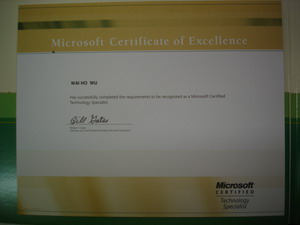
「微軟認證技術專家 (MCTS)」認證的對象,是能在組織中順利地執行 Microsoft 產品或技術, 進而解決商業問題的專業人員。
Microsoft Certified Technology Specialist 是一個國際認可標準,以量度一個資訊科技從業員有否能力去應用微軟產品,不少企業及政府部門更以MCTS為最低入職要求。
微軟專業認證系列包括MCTS, MCITP, MCDST, MCP, MCSA, MCSE, MCSD, MCAD, MCPD, MCDBA, MCT 。不同的認證有不同的要求,而其中以MCTS及MCP最為普及,因為你只須應考一科,合格後即成為MCTS。
Windows Vista 包含了很多有關於效能改善的技術來讓使用者能夠更順暢的完成們平日的工作。為 I.T. 管理人員可以更方便收集、分析甚至自動調整作業系統中所發生的各種事件,對事件處理的功能部分做了最好準備。在改善安全、效能與管理的方便上提供了新的運算信任層級,讓管理人員在建置安全的網路環境時能夠更得心應手,並且不管是在存取控制、網路入侵、或者是資料保護上都能有更強的防護。
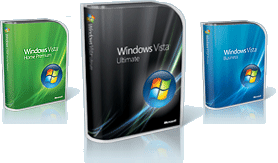
本課程是針對 MCTS on Windows Vista, Configuring 的考試而設計,課程不但讓你深入了解Windows Vista,更為你分析考試內容。
你只須要完成這一個課程即可報考 MCTS on Windows Vista, Configuring 的考試,無須如坊間的電腦中心般要報讀 Course 5115 及 Course 5116 兩個課程方可參加考試,又費時又昂貴!
選擇 EasyPass 的Microsoft課程8大理由!
易通識電腦培訓中心 |
坊間一般的培訓中心 |
微軟Microsoft課程由知名MVP(微軟最有價值專家)兼MCT(微軟認可導師)設計課程及編寫詳盡中英對照筆記;
[免除溫習內容艱深的參考書]
(歡迎到本中心參考我們精心制作的筆記以作比較!) |
使用不知名導師製作的簡單 Powerpoint 及不詳盡的筆記上課
[溫習時要閱讀內容艱深的參考書] |
微軟Microsoft課程提供全 7 科合格保證 |
微軟Microsoft課程只有單一科或沒有合格保證 |
提供最新Latest!及精要模擬題目作溫習 |
提供過量, Outdate甚至沒有模擬題目作溫習 |
提供免費高清課堂錄像作即時溫習及補堂之用,時間彈性! |
要等待課程再開班及有學位時才能補堂,費時失事! |
課程使用最新4核心Quad Core 及 8GB Ram的電腦上課,以便同一時間操控多部Server實習,使學生更能學習真實商業環境的運作! |
使用2核心及2GB Ram的電腦上課,不能同時運行多部Server,學習不到真實商業環境的應用。 |
導師於堂上會詳細說明及教導學生如何能在家中設立多部Server做課堂實習 |
沒有教授在家中做實習的方法,學生只能在堂上做實習,回家後不能溫習 |
代學生登記報名所有課程的公開認証考試 |
學員須要自己登記報考公開認証考試 |
質素保證!所有課程均有免費試讀! |
沒有免費試讀,不能體驗教學質素! |
Microsoft Windows Vista 的 MCTS 認證資格
Microsoft Windows Vista 的微軟認證技術專家 (MCTS)應試者需要滿足下列要求:
科目 (只需要 1 項考試)
(70-620) @Exam
試題數量: 56 題
考試時間: 120 分鐘
合格分數: 700 / 1000 分
模擬試題參考
Microsoft 認證技術專家 (MCTS) 投考人需要通過一項目前的 Microsoft 認證考試,必須能清楚,可靠地表現出技術水準和專長 (所謂目前的考試是指任何尚未取消的考試)。
MCTS 考試是按業界專家所提供的意見開發的,反映出 Microsoft 在全世界各地的組織機構中的使用情形。考試是由兩家遍佈世界各地的獨立認可考試組織, Virtual University Enterprises 和 Prometric 在世界各地主持舉行。
授課導師擁有8年以上微軟認可考試課程教學經驗 ,同學在完成9個小時的專業課程後,我們更安排學生在VUE或Prometric認可考試中心報考 70-620,考試費用為$625,考取合格後即可成為MCTS。而不論你想取得 MCITP、MCSA或 MCSE ,70-620 都是這些認證的Core Exam(即必考科目之一),所以考取70-620是你取得微軟各認可資格的的第一步。
Exam 70-620 MCTS - Vista, Configuring Course Outline:
Module 1 : Installing and Upgrading Windows Vista |
Identify hardware requirements. |
Perform a clean installation. |
Upgrade to Windows Vista from previous versions of Windows. |
Upgrade from one edition of Windows Vista to another edition. |
Troubleshoot Windows Vista installation issues. |
Install and configure Windows Vista drivers. |
Module 2 : Configuring and Troubleshooting Post-Installation System Settings |
Troubleshoot post-installation configuration issues. |
Configure and troubleshoot Windows Aero. |
Configure and troubleshoot parental controls. |
Configure Windows Internet Explorer. |
Module 3 : Configuring Windows Security Features |
Configure and troubleshoot User Account Control. |
Configure Windows Defender. |
Configure Dynamic Security for Internet Explorer 7. |
Configure security settings in Windows Firewall. |
Module 4 : Configuring Network Connectivity |
Configuring networking by using the Network and Sharing Center . |
Troubleshoot connectivity issues. |
Configure Remote Access. |
Module 5 : Configuring Applications Included with Windows Vista |
Configure and troubleshoot media applications. |
Configure Windows Mail. |
Configure Windows Meeting Space. |
Configure Windows Calendar. |
Configure Windows Fax and Scan. |
Configure Windows Sidebar. |
Module 6 : Maintaining and Optimizing Systems That Run Windows Vista |
Troubleshoot performance issues. |
Troubleshoot reliability issues by using built-in diagnostic tools. |
Configure Windows Update. |
Configure Data Protection. |
Module 7 : Configuring and Troubleshooting Mobile Computing |
Configure Mobile Display Settings. |
Configure Mobile Devices. |
Configure Tablet PC software. |
Configure Power Options. |
適合人仕 :
有志投身 I.T. 界的人仕,電腦初學者,電腦技術員, 希望認識Microsoft Windows Vista , 取得 MCTS 認証或將來要考取 MCITP(Microsoft Certified I.T Professional )認證的你。
修讀條件 :
具有基礎 Windows 系統操作經驗,簡單 Internet 及 TCP/IP 網絡知識,對電腦系統及網絡具有濃厚興趣
|
.jpg)
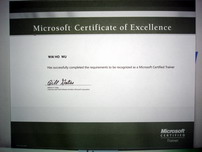
課程由 Microsoft Certified Trainer
親自教授
|
課程包括 :
- Windows Vista 課本及參考書( 10本! )
- 導師精心編寫的考試精讀筆記一套
- 提供最Update模擬試題連參考答案(模擬試題 "一年" 免費更新保證,考試更有彈性)
- 一人一機,理論與實習同時進行
- 課程由 Microsoft Certified Trainer (MCT)
親自教授
- 免費提供高清視像影片作補堂或重溫之用 (不用等侯,即時補堂)
|
.jpg)
|
授課語言 : 以廣東話授課為主,亦會以英語輔助。
課程全長 : 9 小時 / 共 3 堂
開課日期 : (保證合格!)
|
MCTS (Windows Vista, Configuring) Course 單科課程 |
|
[Exam Code: 70-620] |
| Class/Course |
Date Start |
| Video-Vista |
日間 Vista Video 課程,Video 價 $464 Video 課程的優點
免費試睇: 首 1 小時,請致電與本中心職員預約。
合格保障: 半費重考
享用時期: 請與我們聯絡,進度由您控制,可快可慢。 |
教學質素保證:
- 合格保証!不幸肥佬免費重考! [獨家 ] + [ 首創 ]
- 提供最Update模擬試題連參考答案,令你最有效率通過考試
- 保証一人一機!
- 免費提供高清視像影片作補堂或重溫之用 (不用等侯,即時補堂)
- 彈性上課/補堂時間!詳情請電 3426-8614 查詢
免費重考!
現在報讀微軟認證專家 (MCTS) 認證課程,您都可以獲得我們提供合格保證 。 如果您報考考試時不合格的話,我們可讓您免費重考一次,毋須再付額外費用,讓您更輕易,更有信心踏出第一步 。
完成課程及通過一科考試後,可獲取以下的國際認可證書及專業資格: